Car alarm system PROXIMA ZN

AvtoAd
15/09/2022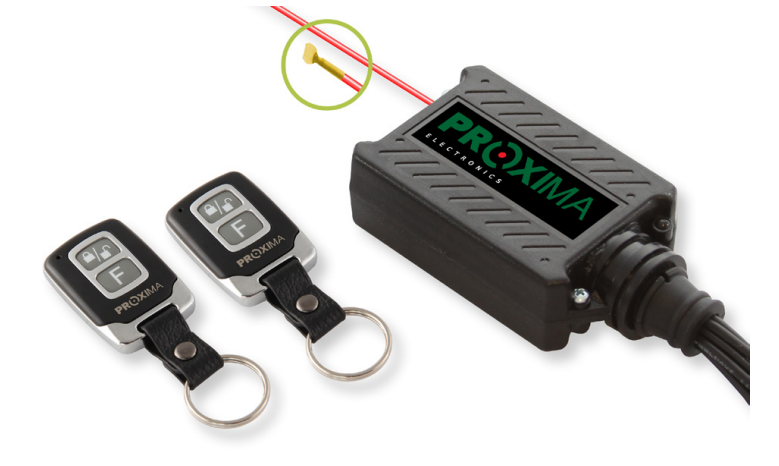
Content
- About PROXIMA ZN car alarm system .
- Installation scheme of the PROXIMA ZN car alarm system .
- Programming with a PROXIMA ZN car alarm radio programmer .
- How to turn on the PROXIMA ZN alarm .
- PROXIMA ZN alarm notification .
- How to turn off the PROXIMA ZN alarm .
- PROXIMA ZN alarm memory .
- How to manually configure the PROXIMA ZN alarm configuration .
- How to configure the PROXIMA ZN alarm configuration using a radio programmer .
- Factory configuration of PROXIMA ZN signaling .
- Importance of groups and pulses in groups for manual programming of PROXIMA ZN singalization .
Car alarm system PROXIMA ZN
PROXIMA car alarms are a family of modern microprocessor programmable devices that meet almost all needs of the installer and the customer. The low price, high reliability, compact design and convenient configuration with a radio programmer (patent pending) contributed to the considerable popularity of this system.
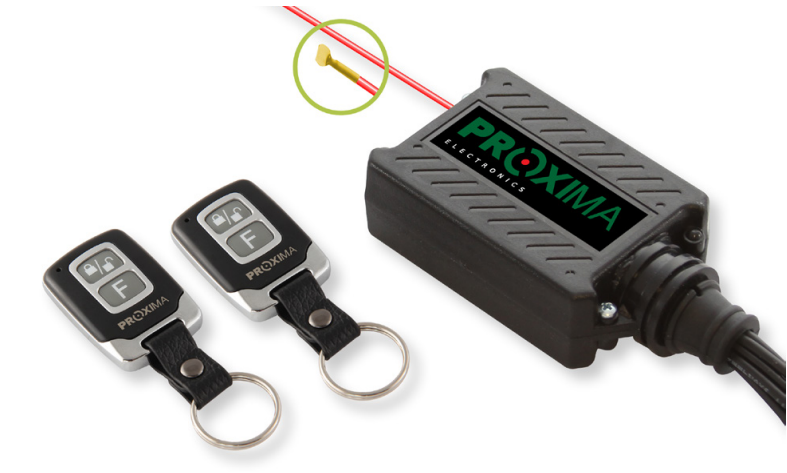
The model has the following features:
- Silent or audible activation/deactivation of the alarm.
- Resetting the alarm after disarming it (without opening the door, turning the ignition switch or pressing button B on the remote control).
- One- or three-second control of the central lock.
- Locking/unlocking the alarm after turning on/off the ignition.
- Comfort function (30-second closing pulse).
- It is possible to disable an additional sensor using the remote control.
- The possibility of working with an additional sensor (for example, ultrasonic) with preliminary signaling (activation of the sensor generates 6 short signals).
- Variable pilot code (Keeloq).
- The possibility of programming with the help of a radio programmer.
- Remote control battery management when the battery is low. The alarm can be turned off, but it cannot be turned on (the siren sounds 8 times).
- Warning about interaction with a microwave sensor (toad signal).
- Opening windows using remote control in cooperation with our window controller.
- "PANIC" function (pressing button B when the alarm is on activates the siren).
- Short-circuit protection on the turn indicator and siren outputs.
- Emergency disarming cable.
- Arming the alarm after 5 or 25 seconds after it is turned on by the remote control (25 seconds allows you to close the windows when the ultrasonic sensor is installed).
- Up to 4 remote controls can be programmed.
- Memory of the last 10 alarms.
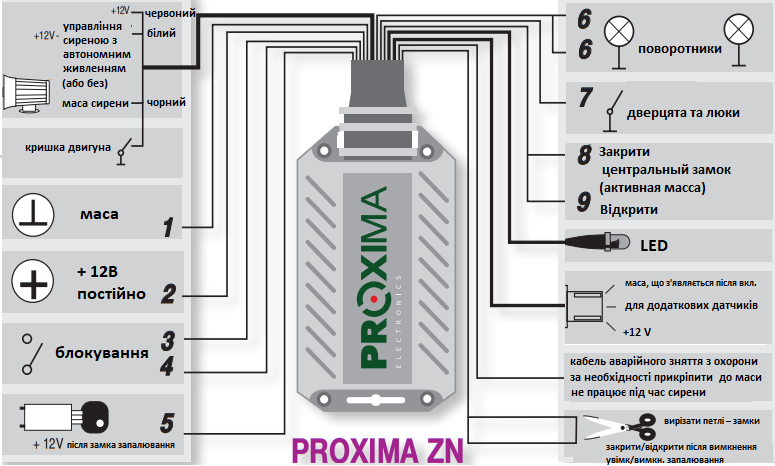
Installation scheme of the PROXIMA ZN car alarm system
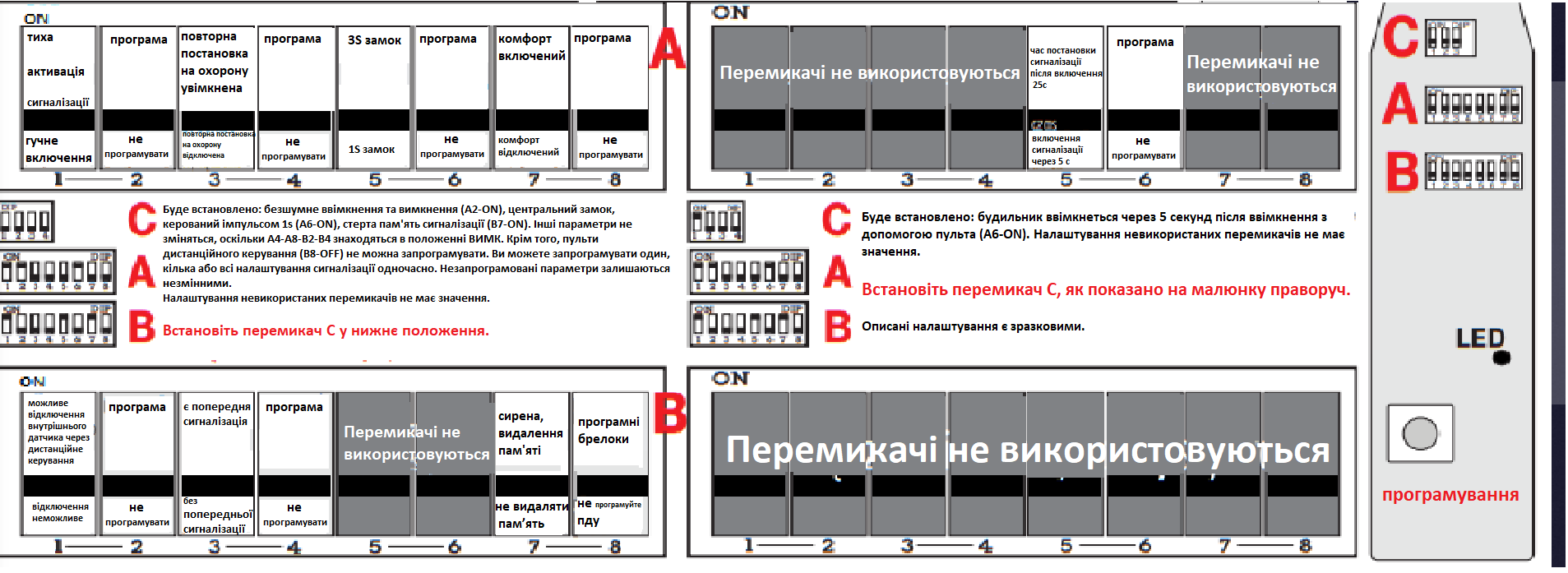
Programming with a PROXIMA ZN car alarm radio programmer
How to turn on the PROXIMA ZN alarm
You can activate the device using the A button on the remote control. This will disable the interlock relay (the car will not be able to move) and grounding to power the additional sensors (connector). The activation of the alarm will be signaled by the siren signal (if the option to turn on and off the loud alarm is enabled) and turn on the turn indicators for 3 seconds.
If the remote control power drops below the acceptable value, pressing the A button on the remote will not activate the siren, but a series of 8 short beeps will occur.
If the external sensor is programmed to be disabled, pressing the B button on the remote control while the turn indicators are on will disable the sensor.
Pressing the A button while the turn signals are on after powering on will also disable the sensor and leave the windows open.
Deactivation of the sensor is signaled by turning off and on again the turn signals, as well as a short siren signal.
At the same time as the indicators are turned on, the control unit gives mass to the output of closing the central lock. This beep lasts for 1 or 3 seconds depending on the option programmed. If the comfort function is activated, the mass at the exit of closing the central lock remains for another 25 seconds.
After closing the central lock, the alarm does not respond to the ignition for 5 seconds, to the door and the external sensor for 5 seconds (or 25 seconds). After this time, the LED will start flashing slowly and the alarm will turn on.
Pressing button B when the alarm is activated activates the alarm siren ("PANIC" mode) for 10 seconds. The control panel has a limited number of sirens triggered by door opening or sensor activation. After 10 sirens from an open door or an additional sensor, the control panel stops responding to these inputs.
Activation of the siren after turning the ignition switch resets the counter of sirens caused by door opening and sensor activation, and then the control panel responds to all activations again.
If the pre-siren function is enabled, activation of the external sensor will not trigger the siren, but will only turn on the signal diode and generate 6 beeps. If the detector is activated again within 30 seconds of the previous siren, the control panel will activate.
Alarm notification PROXIMA ZN
The signal lasts 30 seconds. At this time, the turn indicators should flash. Pressing the A button on the remote will silence the siren. Pressing the B button on the remote only shortens the beep (not turns it off) and the PDA goes into standby mode.
How to turn off the PROXIMA ZN alarm
Pressing the A button on the remote control while the alarm is on will turn it off. Disarming of the alarm is indicated by two short beeps of the siren (if the loud alarm on and off option is set) and two long flashes of the turn signals. If the alarm has been triggered at least once during the alarm waiting period, the control panel will generate 4 short alarm pulses (alarm memory) regardless of whether the loud alarm activation and deactivation option is enabled.
Pressing the A button within 3 seconds after turning on the turn signals commands the PROXIMA window controller and opens the windows fully. If the alarm is activated, the LED starts flashing at a frequency of approximately 2 Hz, if the door is not opened for 50 seconds, the ignition is not turned on, or button B on the remote control is not pressed, the alarm will be activated again. Pressing the B button is signaled in the same way as turning off the alarm. When the alarm is disarmed, the blocking relay turns on (you can drive the car) immediately after turning on the ignition (with the car lock turned off) and turns off 50 seconds after turning off the ignition.
PROXIMA ZN alarm memory
The alarm has a memory of the last 10 alarms. 50 seconds after the ignition is turned off, the LED lights up. If the door is opened three times within 5 seconds after turning on the LED, the alarm will start reading the memory of the last 10 alarms.
The alarm generates a series of pulses, turning on and off the turn signals and indicator light. The number of pulses indicates the source of the alarm. Ignition lock alarm 1 pulse, door 2 pulses, additional sensor 3 pulses, voltage drop sensor (multisensor) 4 pulses, thief 5 pulses, pressing the PANIC button 6 pulses.
Groups of pulses are separated from each other by intervals of one second. Signals are read in order from smallest to smallest. If there are no 10 alarms in the memory at the time of reading the memory, the reading will be correspondingly shorter.
How to manually configure the PROXIMA ZN alarm configuration
The alarm can be configured without a radio programmer.
50 seconds after the ignition is turned off, the LED lights up. If, after turning on the diode, the ignition is turned on and off 5 times, the alarm will enter the configuration mode, which will be confirmed by a siren signal. Then the alarm will generate 9 groups of pulses (the first 7 groups have 2 pulses each, the rest of the groups have 1 pulse each). Each group starts with a siren signal, then, depending on the group, there are 2 or 1 pulses lasting 1.5 seconds (the turn signals and the LED are turned on). The pause between pulses in one group is 0.3 s.
The break between groups lasts 3 seconds. The selection of the corresponding options consists in turning on the ignition after the corresponding pulse of the corresponding group. Turning on the ignition is signaled by the instantaneous dimming of the LED and dimming of the indicators. If the ignition is not turned off after programming the options, the alarm waits for it to be turned off and only then generates the next groups (standby mode).
Selecting the first pulse in a group with two pulses shortens the generation of that group (the second pulse is not generated). Programming key fobs consists in pressing any key in the following key fobs. Remote control programming is signaled by turning on the LED, turn signals and siren.
Programming is completed after 4 remote controls have been programmed or 13 seconds after the last remote control has been programmed. Key fobs are not programmable (key fob programming automatically deletes old fobs). Failure to program any fob after entering programming will not delete old fobs.
How to configure the PROXIMA ZN alarm configuration using a radio programmer
It is possible to configure the alarm using the radio programmer if the alarm is turned off.
1. Set radio programmer switches (first or second group of functions).
2. Turn on the car ignition. Press two buttons on the remote at the same time (the signal diode will start flashing).
3. Press the programmer button for a few seconds.
Configuration programming is signaled by siren activation for 2 seconds. Turning off the ignition while the control unit is waiting for a command from the programmer (the LED is flashing) interrupts programming.
Depending on your needs, you can program one, several or all functions. Erasing the alarm memory and programming the remote control is done with one switch.
Factory configuration of PROXIMA ZN signaling
Factory alarm configuration:
- without comfort function;
- second control of the central lock;
- loud activation and deactivation of the alarm;
- without alarm function;
- without disconnecting the sensor, without pre-alarm;
- quick arming (5s);
- the alarm memory is erased.
Importance of groups and pulses in groups for manual programming of PROXIMA ZN singalization
Group 1 :
pulse 1 - silent activation/deactivation of the alarm;
pulse 2 - loud activation / deactivation of the alarm.
Group 2 :
pulse 1 - rearming is on;
pulse 2 - for rearming is disabled.
Group 3 :
pulse 1 - 3s control of the central lock;
pulse 2 - 1s control of the central lock.
Group 4 :
pulse 1 - the comfort function is turned on;
impulse 2 - the comfort function is disabled.
Group 5 :
pulse 1 - possible disconnection of the additional sensor;
pulse 2 - it is impossible to turn off the additional sensor.
Group 6 :
pulse 1 - previous alarm is on;
pulse 2 pre-alarm is disabled.
Group 7 :
pulse 1 - not used;
pulse 2 - not used
Group 8 :
pulse 1 - slow alarm setting 25s;
pulse 2 - quick alarm setting 5s.
Group 9 :
pulse 1 - erase the alarm memory.
Group 10 :
pulse 1 - remote control programming.
Note: selecting no pulse in the group leaves the old settings.